Get paid faster, see what's owed
Deposits, VAT or GST, proformas and payments — with overdue invoices flagged automatically, so you can see who to chase. Push to Xero, and let customers pay online from their invoice link.
No sign-up. Click around a demo glazing company's day — sending is switched off, so nothing you do reaches anyone.
- No setup fee
- iPhone, Android & web
- Every feature on every plan
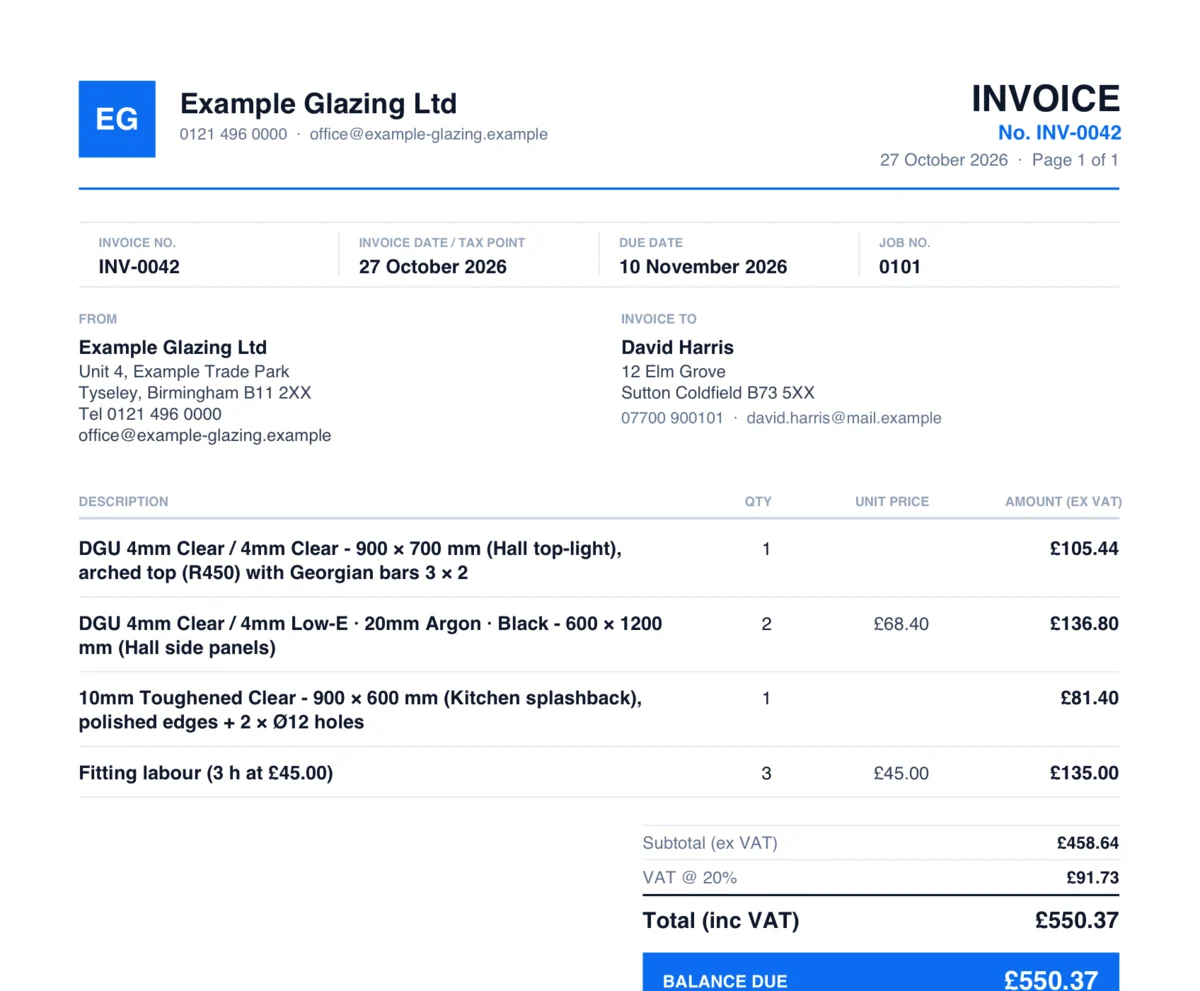
From job completion to payment recorded — fully tracked
Coglass invoicing follows the natural flow of a glazing job. Here's how it works in practice.
Create the invoice
Raise a standard invoice, deposit invoice, or proforma directly from the order. All job details, glass lines, and pricing carry across automatically — no re-entering data.
Set payment terms
Set the issue date, due date and payment terms (e.g. 14 days, 30 days, on completion). Coglass automatically flags the invoice as overdue if the due date passes without payment.
Send to customer
Email the PDF invoice to your customer from Coglass, with a link to view it online. The invoice shows every line, the tax breakdown and how to pay.
Record payment
When payment arrives, open the invoice and record it: amount, date, method (cash, BACS, card, cheque) and reference. Partial payments are tracked automatically — the outstanding balance updates in real time.
Track what's owed
The invoices dashboard shows Total Outstanding, Overdue, Paid This Month and Draft at a glance. Filter by status to chase what needs chasing — no mental arithmetic required.
Payment history
Every payment is logged against the invoice with method, date and reference.
Invoice features built for glazing businesses
Everything you need to get paid on time and keep your accounts in order.
- Three invoice typesStandard invoice, deposit invoice and proforma — all generated from the same order.
- VAT and GST handlingVAT or GST calculated automatically at your country's rates. Totals before and after tax shown clearly on every PDF.
- PDF invoice download and emailGenerate professional PDFs instantly and email them directly to your customer from within Coglass.
- Partial payment trackingRecord payments as they come in. Outstanding balance updates automatically after each payment.
- All payment methodsRecord cash, BACS, card, cheque or other payments — with date, amount, reference and notes.
- Overdue flaggingInvoices are automatically marked overdue when the due date passes without full payment.
- Invoice status dashboardSee Outstanding, Overdue, Paid This Month and Draft totals at a glance every time you open invoices.
- Pay onlineCustomers can pay an invoice online from its link. Card and PayPal checkout on your own webshop is coming soon.
- Deposit invoicesRaise a deposit invoice for a percentage or fixed amount before work begins — common on large commercial jobs.
- Custom invoice numberingSet your own prefix and starting number so Coglass invoices match your existing numbering system.
- Void invoicesMark invoices as void if cancelled — they remain on record for your accounts but are excluded from totals.
- XeroInvoices, payments and supplier bills push to Xero, coded to the accounts and VAT rates you map.
More of Coglass
New to this? Read what glass software should cover, from quote to invoice.
See what you're owed at a glance
Book a demo and we'll walk you through it on the kind of jobs you do.
No sign-up. Click around a demo glazing company's day — sending is switched off, so nothing you do reaches anyone.