Every job, start to finish, in one thread
From the first enquiry to the final paid invoice, every job lives in one place your whole team can see — statuses, notes, site photos and history. No more "which spreadsheet was that on?"
No sign-up. Click around a demo glazing company's day — sending is switched off, so nothing you do reaches anyone.
- No setup fee
- iPhone, Android & web
- Every feature on every plan
Jobs don’t go quiet without someone noticing
In a busy week the jobs that get lost aren’t the big ones — they are the phone enquiry nobody wrote down, the quote nobody chased and the order nobody placed.
Quick Go
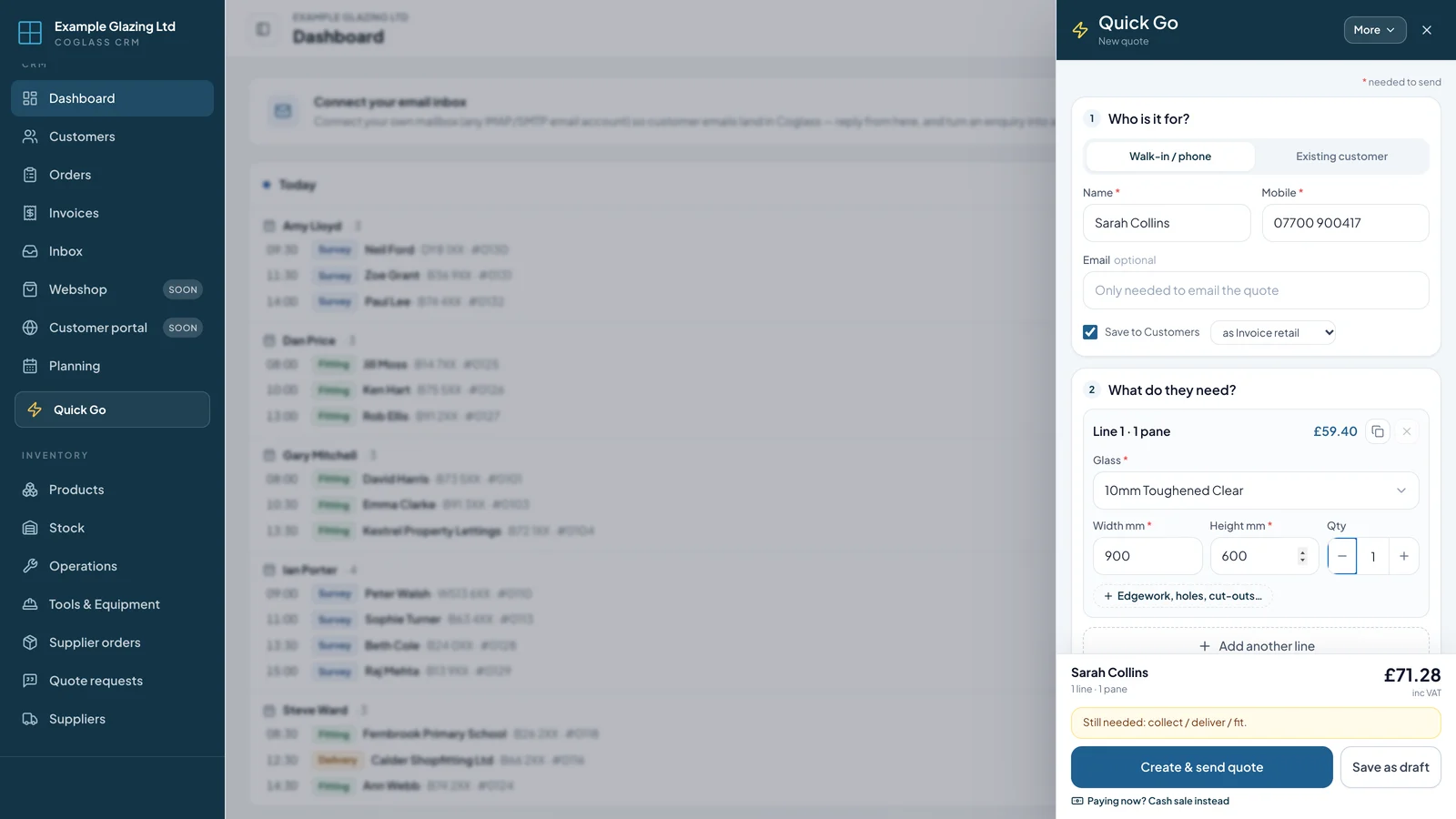
The problem. The phone rings while you are mid-invoice: “How much for a 600 × 400 toughened pane?” Opening a new order, finding the customer and building a quote means losing your place.
How Coglass fixes it. Press Quick Go on any page. A panel opens on the right, over what you were doing: pick the customer, or Walk-in / phone for someone new, add the glass and size, and the price shows straight away. Send the quote by text or email, save it as a draft, or sell it there and then.
What you see
- Sealed units with the gap and spacer bar set on the line
- Scaffold and access hire charged once per job
- Delivery or fitting asks for the address
- Cash sale for the counter: record cash, card or on account, then the receipt and the collection sign-off
- Show their saving on this quote, when their price list saves them money
- Message shortcuts: your own ready-made texts, set in Settings → Quick Go
Needs attention
The problem. A quote goes out, the customer goes quiet, and three weeks later nobody has chased it. An order sits at To order because everyone thought someone else had placed it.
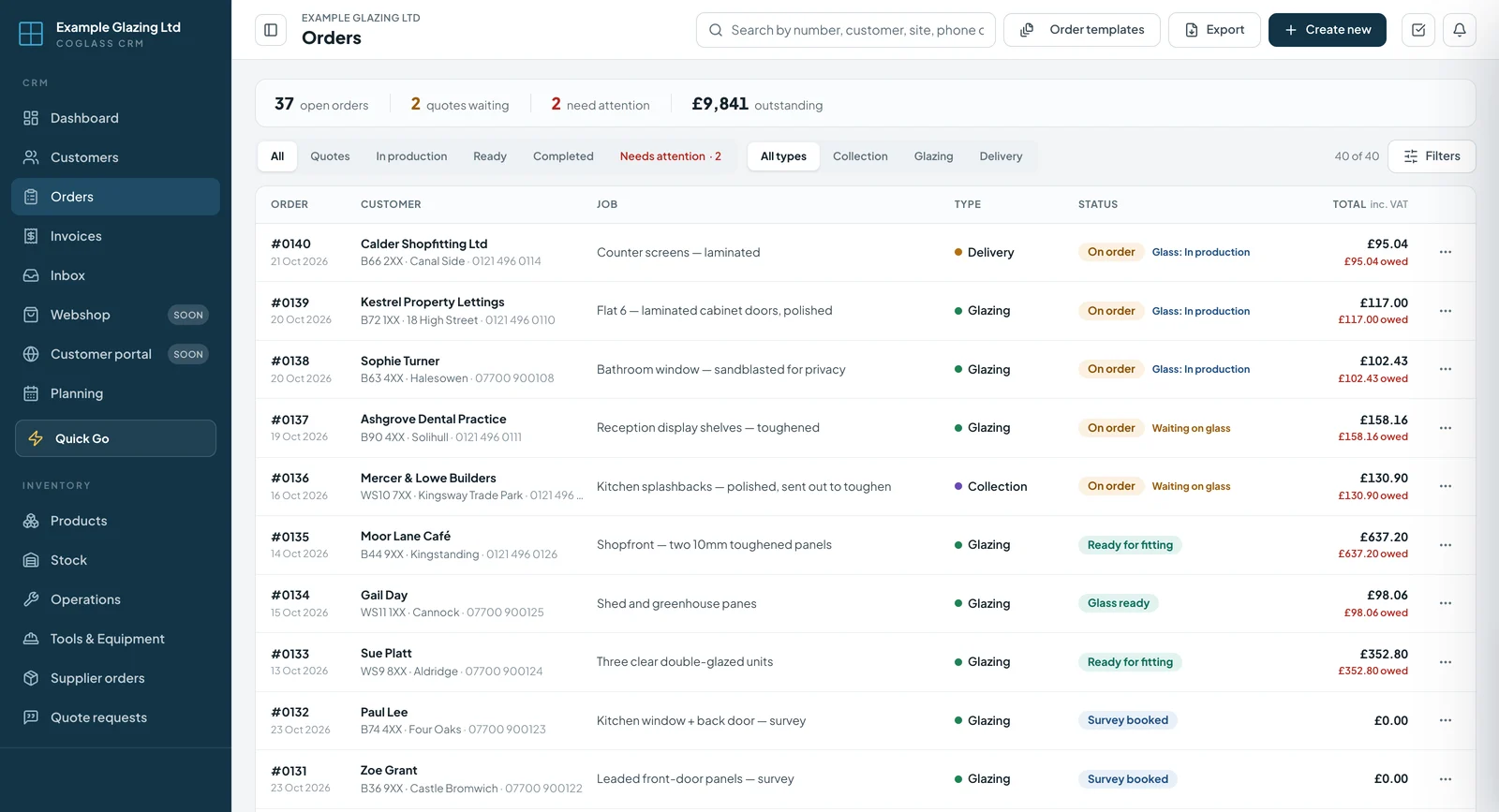
How Coglass fixes it. Coglass watches how long each open job has sat in the same status — for example 2 days at New request, 5 days at Quote sent, 14 days at On order — and flags the ones that have gone quiet.
What you see
- A red Needs attention tab on the Orders page and a card on the dashboard
- Jobs a fitter marked for re-order at the top, with a Re-order badge
- A morning email to owners and admins listing the jobs that have gone stale
- Snooze 7 days when you know a job is fine
Surveys to follow up
The problem. The surveyor has been out and the measurements are in — but the quote waits because the office didn’t know the survey was done.
How Coglass fixes it. When a survey is finished the office gets a notification, and the job stays on the dashboard until it is quoted or the fitting is booked.
What you see
- Each survey tagged Needs quote or Book fitting
- Oldest first, so the longest wait is at the top
One place for the whole job lifecycle
Coglass moves a job through every stage — and keeps everyone looking at the same record.
Capture the enquiry
Phone, email or your website enquiry form — the customer, site address, contacts and job description go into a new order.
Quote or survey
Send a quote or book a survey straight from the order. Everything stays attached to the same job.
Track the status
Watch the job move through new request → survey → quote → on order → glass ready → fitting → completed, with the right label for collection, delivery or glazing.
Keep notes & photos
Internal notes, site photos and documents live on the order so the whole team has the full picture — office and field.
Numbers never reused
Every order gets the next number in line, and a number is never used twice — even after a job is deleted — so your records stay clean.
Through to invoice
When the job completes, raise the invoice, take payment and push to Xero — all from the same order.
Everything a glazing job needs, attached
No more juggling spreadsheets, notebooks and group chats.
- Full order lifecycleStatuses from enquiry to paid, with type-aware labels for collection, delivery and glazing jobs.
- Order templatesSave common jobs as templates and spin up repeat work in seconds.
- Numbers never reusedOrder numbers always go up and are never used twice, even after a job is deleted.
- Trash and restoreDeleted orders go to the Trash first — bring one back, or remove it for good. Nothing lost by accident.
- Site contacts & addressesMultiple site and billing addresses with tap-to-call and map links.
- Internal notes & photosThread notes and job photos against the order for the whole team.
- “Needs attention”Jobs sitting too long in one status are flagged on the Orders page and the dashboard, with a morning email to owners and admins.
- Quick GoOpens from any page: price a phone or walk-in enquiry, then send the quote or sell it there and then.
- DocumentsRAMS, quotes, invoices and job files all attached to the order.
- Whole-team visibilityOffice on the web, fitters on the app — one shared record that keeps itself in sync.
- Linked extra jobsCreate a new linked job from site for the same customer, even offline.
- Customer quote, invoice and tracking pagesEach customer gets their own private link to track the job, see the quote and pay the invoice.
More of Coglass
New to this? Read what glass software should do for a glass shop.
Run every job from one place
Book a demo and we'll walk you through it on the kind of jobs you do.
No sign-up. Click around a demo glazing company's day — sending is switched off, so nothing you do reaches anyone.