Quote in seconds, not after tea-time
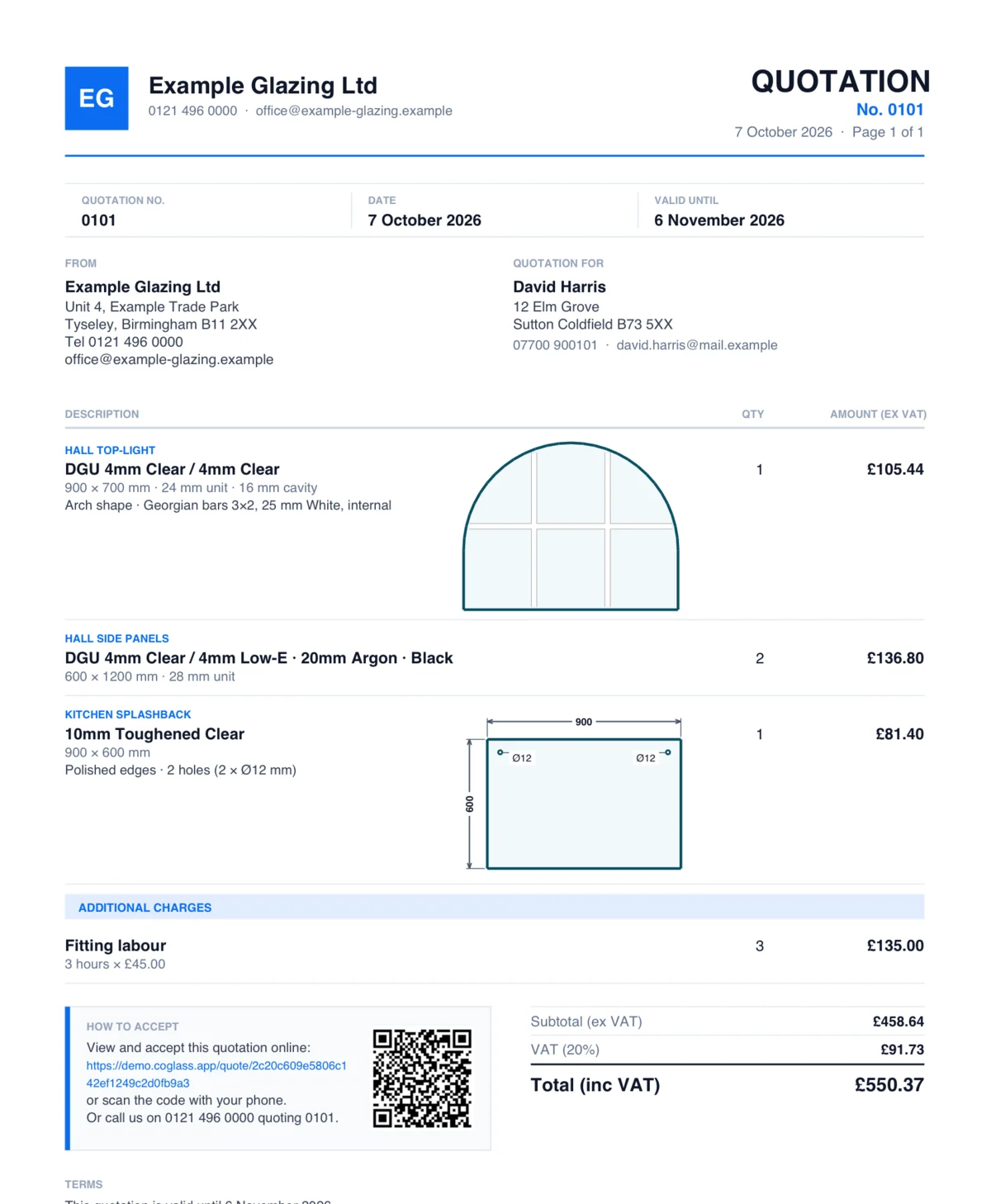
Stop retyping quotes in Word. Coglass builds the quote straight from the glass spec and prices it the way glaziers actually price — variants, trade rates, labour and energy — then sends a branded PDF the customer accepts online with one tap.
No sign-up. Click around a demo glazing company's day — sending is switched off, so nothing you do reaches anyone.
- No setup fee
- iPhone, Android & web
- Every feature on every plan
For the jobs that don’t go to plan
Customers send photos instead of sizes, want two prices for one house, and change the job after the survey. Coglass handles each without starting again.
A price from their photos
The problem. The customer wants a rough price before you drive out to measure, but a normal quote commits you to sizes you have only guessed.
How Coglass fixes it. Send it as a Provisional quote. The customer can say “yes, come and measure”, but no glass is ordered and no deposit is asked for until the real quote, with measured sizes, goes out after the survey.
What you see
- “From their photos — final price after we measure” on what the customer receives
- The job moves to Provisional quote accepted, ready to book the survey
Separate quotes for one job
The problem. The landlord wants the front and back of the house priced separately, and you end up keeping two copies of the same order.
How Coglass fixes it. Press Split into separate quotes on the work bench and drag each pane into a section. Coglass offers a quote for each section next to one for the whole job.
What you see
- Quote A for the complete job, plus sections B, C and so on
- Accept the whole job or the sections — whichever isn’t chosen shows as superseded
- Each section invoiced on its own
Scaffold charged once, not per pane
The problem. Tag scaffold on ten panes and it gets charged ten times — so you take it off and add it by hand, and sometimes forget.
How Coglass fixes it. Set up scaffold, a MEWP or other access as shared hire with a day rate. However many panes need it, the job gets one Access & hire charge: day rate × days.
What you see
- One Access & hire line on the quote and the quote PDF
- The number of days changed on the job when you need to
- Raise hire order sends the hire company an order for the days you need
When the job changes after the quote
The problem. The survey finds a bigger size or the customer adds a pane, and the invoice no longer matches what they agreed. That is how arguments start.
How Coglass fixes it. A sent quote keeps its price. Change the job afterwards and Coglass shows what was quoted next to what it comes to now, and offers Send amended quote.
What you see
- The customer sees the reason and each change in plain words, such as “Labour added: 2 hours”, and accepts online
- When you invoice a changed job, Coglass asks whether to bill the new amount, send the amended quote first or keep to the quoted price
- Every quote version kept on the job
Trade prices that stay put
The problem. Each builder account has its own rates, and a price rise shouldn’t move a quote they already have.
How Coglass fixes it. Give a customer, or a whole customer type, a price list: a discount off everything, fixed rates per product, quantity breaks and contract dates. Quotes keep the prices they were sent at.
What you see
- Test a price: pick a customer and a product and see what they would pay, and which rule set it
- Import from PDF reads a price list you already have into the rules, for you to check
From enquiry to accepted quote — without the paperwork
Coglass handles every step of the quoting process. Here's exactly how it works.
Enquiry comes in
Customers submit enquiries via the embedded web form on your website, or your team creates an order directly in Coglass. Customer name, address, contact details and job description are all captured.
Add glass specifications
Add each pane to the quote: dimensions (width × height in mm), quantity, product type (cut size, DGU, toughened, laminated), and any operations like polished edges, cutouts or Georgian bars.
Price is calculated automatically
Coglass calculates the price based on square metre rates or unit pricing from your product catalogue. Labour and installation charges are added automatically from your settings, or adjusted per job.
Send the quote
Press Send quote, check the preview and send it by email or text. The customer gets the PDF, a link to view and accept it online with no login, or both.
Customer accepts — or declines — online
The customer accepts on their quote page and your team is notified. If you ask for a deposit, the job waits for it before going to order. Customers can also decline, with a reason.
Ready to order
The accepted job keeps every glass specification, ready for supplier ordering, production and scheduling — nothing re-typed.
Everything you need to quote faster and win more jobs
Every quoting feature is on every plan.
- Branded PDF quotesYour company name, logo and colours on every quote.
- Multiple quote variantsSend two or three options in the same quote — e.g. standard vs Low-E glass — and let the customer choose.
- Online customer acceptanceNo printing, no signing, no scanning. Customers accept the quote from a link on their phone.
- Auto price calculationSquare metre and unit pricing calculated from your product catalogue the moment you select a product.
- Labour and installation costsAdd labour rates and fitting charges automatically, or override per job.
- Trade price listsPer-customer and per-type price lists with discounts and quantity breaks, applied automatically. Prices freeze when the quote is sent.
- Quote notesAdd internal notes for your team and visible notes that appear on the customer's quote PDF.
- Quote statusSee every quote as draft, sent, accepted or declined.
- Full glass specificationDGU, TGU, toughened, laminated, Low-E, Georgian bars, lead, cutouts, polished edges — all on the quote.
- Embedded enquiry formAdd a glass enquiry form to your own website. Customer enquiries land directly in Coglass ready to quote.
- VAT and GST handlingPrices shown before and after tax. VAT or GST calculated automatically based on your registration settings.
- No re-keyingThe quote is already the order — once accepted, its glass specs carry straight through to production.
More of Coglass
New to this? Read how to choose glass software for quoting and pricing.
Start sending better quotes today
Book a demo and we'll walk you through it on the kind of jobs you do.
No sign-up. Click around a demo glazing company's day — sending is switched off, so nothing you do reaches anyone.