Glazing software for New Zealand glaziers.
Quotes with the glass drawn on every line, surveys on the phone even out of coverage, purchase orders to suppliers, scheduling and GST invoices. One system for the office, the van and the workshop.
- Phone, iPad & web apps
- Priced in NZD
- UK-based team supporting New Zealand
- From NZ$209a month, no GST added
- Every featureon every plan
- No setup feeno minimum term
- iPhone · Android · web
Why Coglass suits glaziers in New Zealand
Our team is in the UK, 11 to 13 hours behind New Zealand depending on the season, so our working day is your evening and night. Email any time and we usually reply within one UK working day; we will agree a demo time that suits you.
GST at 15%
Quotes and invoices in New Zealand dollars, with your GST number and GST at 15%.
Safety glass clearly specified
For NZS 4223.3 work, put the glass and its safety-glass grade on the line itself, so the quote, the purchase order and the job sheet all agree.
WhatsApp-first messaging
Customers in New Zealand would rather WhatsApp than text. WhatsApp messaging is built into Coglass and waiting on Meta's approval; until it switches on, email, SMS and the chat on your quote and tracking pages work today.
Surveys out of coverage
Measure, draw and photograph every opening on the phone, wherever the job is. It syncs when you are back in coverage.
Xero, set up your way
Invoices, payments and supplier bills push to your Xero organisation, coded to your own accounts and GST rates.
Customers pay by card
Connect your Stripe account and customers can pay an invoice by card from its link.
Draw it once. Quote it, order it, make it.
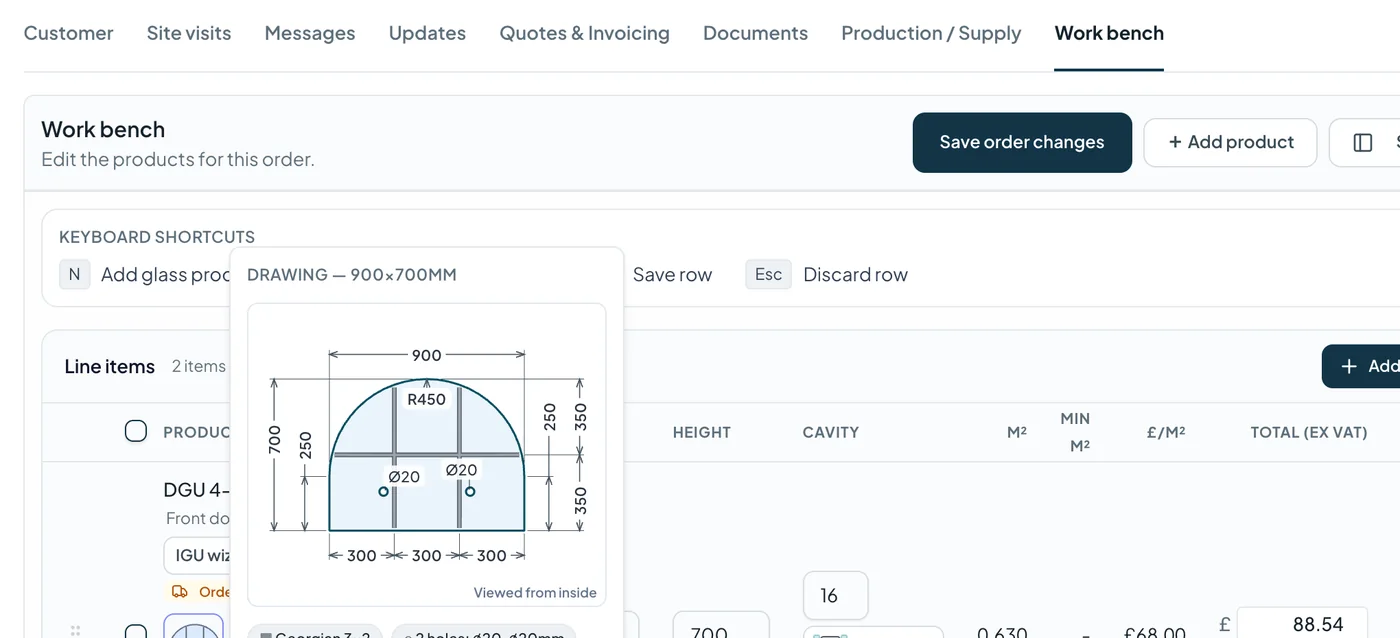
Each pane is drawn to size in mm with its shape, holes, cut-outs, Georgian bars or leaded lights. The same drawing prices the line, goes on the quote, the supplier's purchase order and the workshop's cutting sheet.
- Full double- and triple-glazed unit make-ups, cavity set per line
- Edgework, toughening, laminating — in-house or bought in
- Trade price lists and quantity breaks applied automatically
The whole shop floor on one board
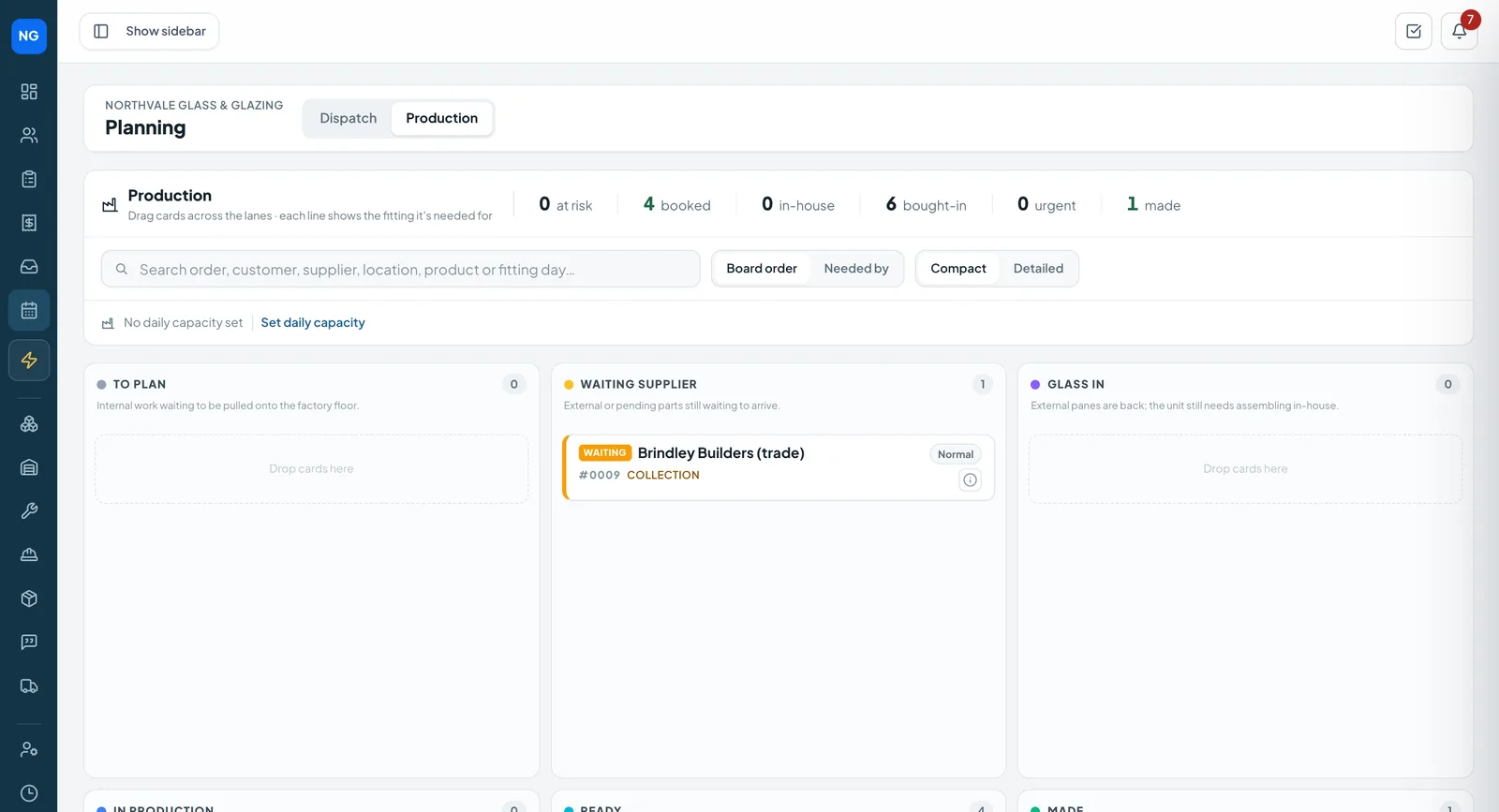
Every line lands on the production board when the job is ordered — waiting on a supplier, glass in, in production, ready, made. At the bench, the shop-floor iPad shows the cut list and moves panes on with a barcode scan.
- Barcode labels for every pane
- Sealed-unit steps checked pane by pane
- Keeps working when the workshop wifi drops
Run the whole business from an iPad
The office CRM in Safari, the production board at the bench, a trade counter with live pricing, and surveys and fittings on site — all on the same jobs.
- Quotes, the planner and invoices in the browser
- Cut list, scan to advance and sealed-unit steps in the workshop
- Counter sales signed for on screen
From the first enquiry to the final payment
Every plan includes all of it. Plans differ by how many people use Coglass and how much you put through it.
Jobs & orders
Every job from first enquiry to paid invoice in one record the whole team can see.
- Statuses for glazing, collection and delivery jobs
- Notes, photos and documents on the job
- “Needs attention” flags for jobs left sitting
Quoting
Quotes priced from your catalogue and trade price lists, with the drawing on every line.
- Branded PDF quotes and quote options
- Customer accepts or declines online
- Deposits asked for automatically
Surveys
Measure on the phone — shapes, photos, access notes and GPS — even with no signal.
- Works offline, syncs later
- Photos per opening
- Survey straight onto the work bench
Glass specs
Full DGU/TGU make-ups, edges, shapes, holes, cut-outs, Georgian bars and leaded lights.
- Cavity and spacer set per line
- Drawn to size in mm
- 1:1 lay-under template print
Production
One board from To plan to Made, with the shop-floor iPad at the bench.
- Barcode labels and scan to advance
- In-house or bought-in operations
- IGU sealing steps
Suppliers
Purchase orders with the drawing on them, receipts, and automatic chasers when glass is late.
- Numbered POs per job
- AI reads supplier price-list PDFs
- Outwork orders to processors
Planning
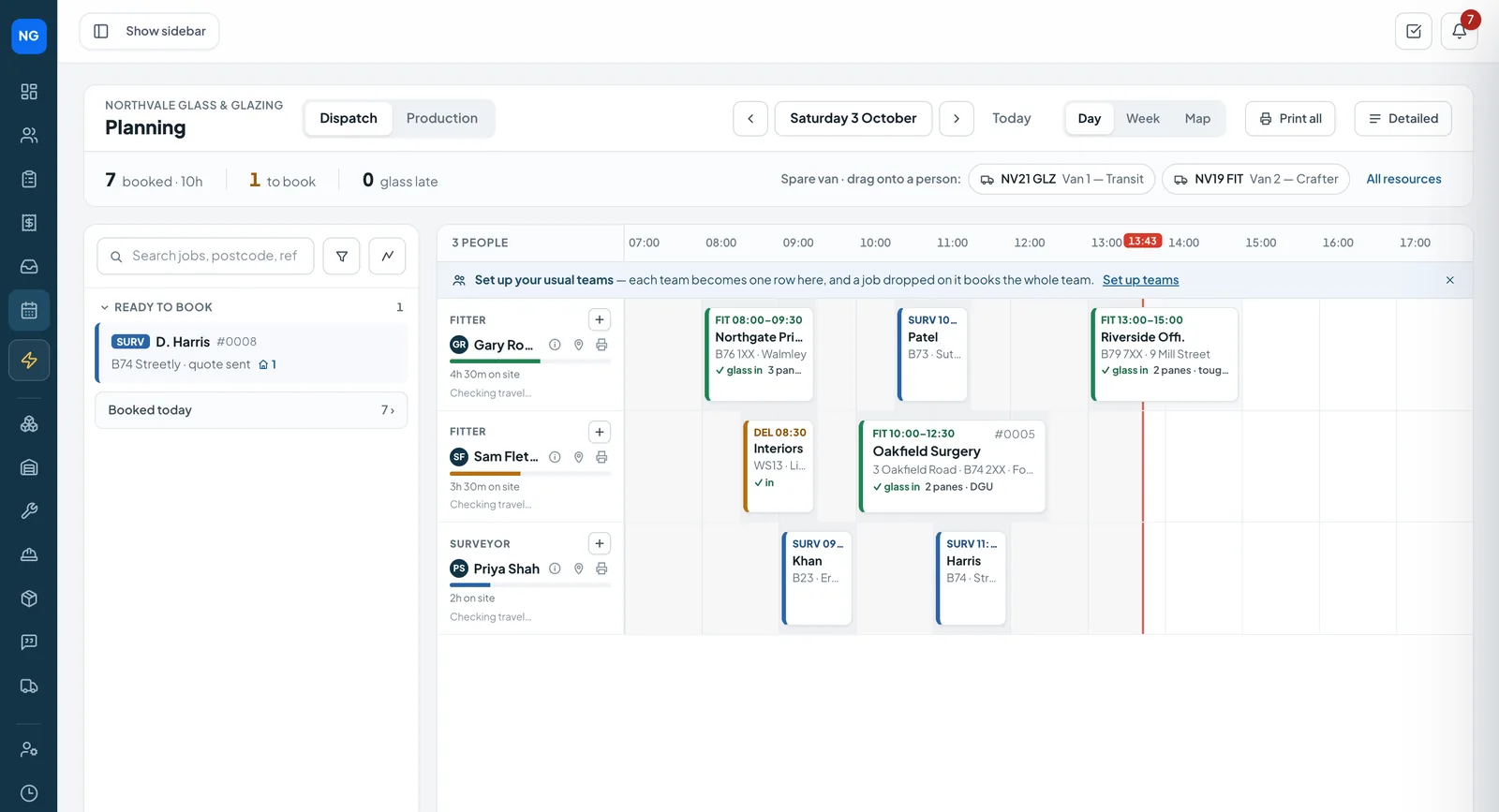
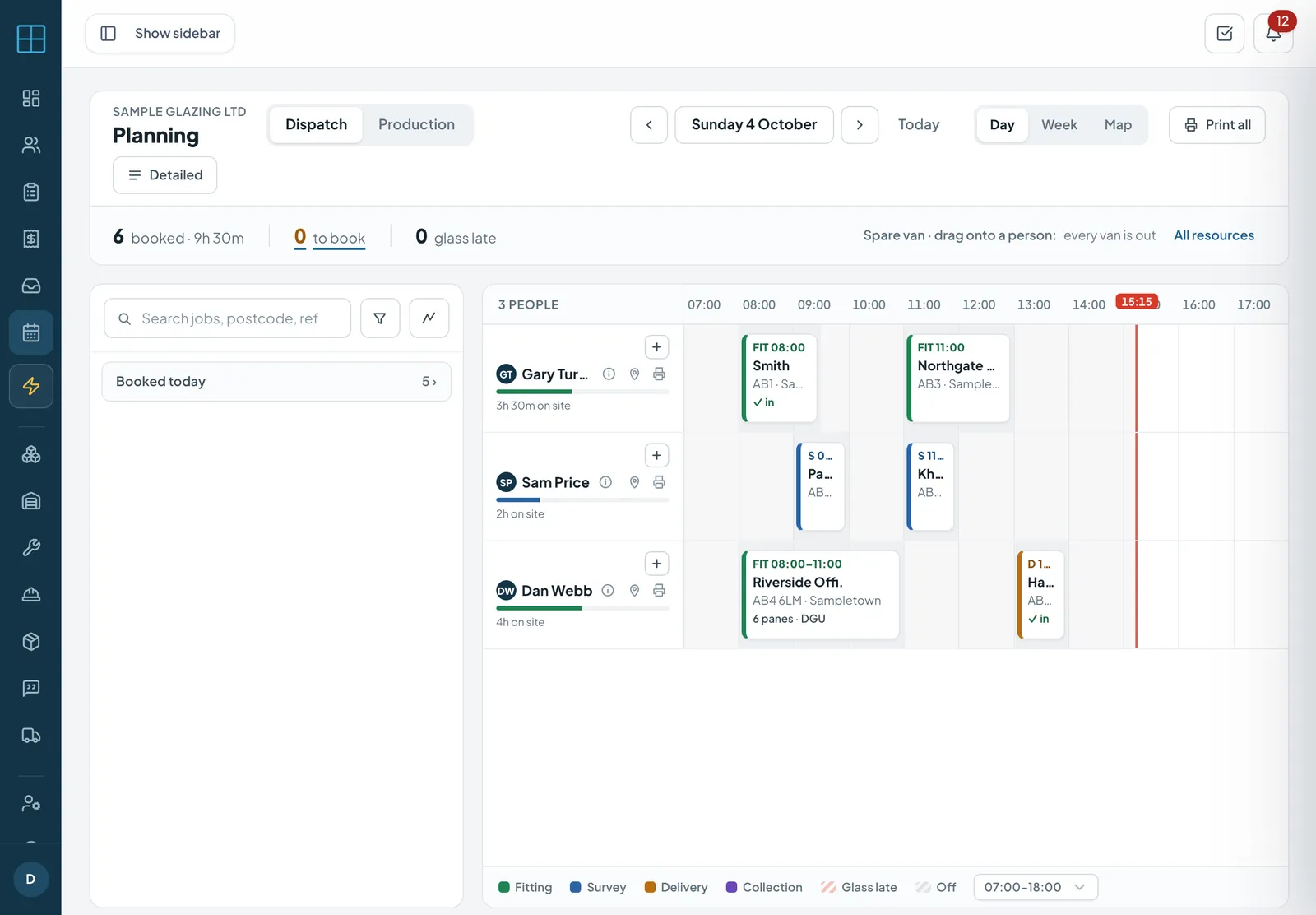
Drag surveys, fittings and deliveries onto people and vans for the day or week.
- Holidays block the board
- Nearby ready jobs suggested
- Fitters see their day on the phone
Fitting & delivery
Per-pane sign-off on site with photos, GPS and the customer's signature.
- Partial fits and re-orders flagged
- Delivery and collection proof
- Draft invoice raised on completion
Invoicing
Deposit, proforma and final invoices with GST, payments recorded, and Xero.
- Overdue invoices flagged
- GST on every invoice
- Invoices and payments push to Xero
Customer messages
Email, SMS and quote-page chat on the job, with automatic updates as it moves.
- Gmail and Outlook inbox
- SMS and email updates
- WhatsApp coming soon
AI glass scan
Glass sizes read out of a customer's email, matched to your products and prices, and added to an order.
- Reads quantities and sizes
- Matched to your catalogue
- You check before it's added
Customer portal Coming soon
A branded login for homeowners and trade customers to see and act on their jobs.
- Next visit, add to calendar
- Approve quotes, pay deposits
- Trade sites, statements, supply orders
Live tracking
An on-our-way text with a tracking link, sent when the fitter sets off.
- Arrival window and stop number
- Message the office or the fitter
- No app for the customer
Glass labels
A barcode label on every pane, scanned in at goods-in.
- Job, opening and size on the label
- Scan to mark glass received
- Job shows ready for fitting
Also in Coglass:
From the first email to the money in the bank
One record follows the job the whole way — the office, the van and the workshop all see the same thing.
Enquiry
An email or a call becomes an order — the AI glass scan reads the sizes out of the email for you.
Survey
Measure, draw and photograph every opening on the phone or iPad, even with no signal.
Quote
Priced from your catalogue with the glass drawn on each line; the customer accepts online.
Glass ordered
Purchase orders to your supplier from the job, with the drawing on them — or onto your own production board.
Labels
A barcode label on every pane; scan it in when the glass arrives and the job shows ready.
Fitting
Booked on the planner, an on-our-way text to the customer, per-pane sign-off and a signature on site.
Paid
The invoice is drafted when the fitting is signed off; the customer pays online and it goes to Xero.
The phone app your fitters will actually use
Today's jobs, surveys drawn on the phone, per-pane sign-off with photos and a signature, clock in and out — and it keeps working with no signal.
Staff sign in with the login their company gives them. More about the app.
Fitting · Northgate School
Simple monthly plans in NZD
Every plan includes the web app, the phone app for fitters and the shop-floor iPad app. No GST added — prices are for GST-registered businesses. No setup fee, no minimum term.
Starter
NZ$209
per month, no GST added
- 1 office login
- 3 fitters on the phone app
- 150 orders a month
- 1 email inbox
Professional
NZ$469
per month, no GST added
- 3 office logins
- 8 fitters on the phone app
- 500 orders a month
- 3 email inboxes
Business
NZ$939
per month, no GST added
- 7 office logins
- 12 fitters on the phone app
- 1,500 orders a month
- 7 email inboxes
The local rules, in plain English
Short guides to the standards and paperwork glaziers in New Zealand deal with — and where Coglass helps.
NZS 4223.3 safety glazing
What NZS 4223.3 covers, how it links to Building Code clause F2, and a routine that keeps the right glass on the job.
Read the guide: NZS 4223.3 safety glazing →GST and taxable supply information
GST at 15% and what your invoices must show since tax invoices became "taxable supply information" in 2023.
Read the guide: GST and taxable supply information →Health & safety and working at height
Your duties under HSWA 2015, site-specific safety plans, and notifying WorkSafe about work at height.
Read the guide: Health & safety and working at height →
Coglass in New Zealand: common questions
Can I use Coglass in New Zealand?
Yes. Coglass is sold in New Zealand in NZ dollars, to GST-registered businesses.
Do my invoices show GST?
Yes — your GST number and GST at 15%, with quotes and invoices in NZ dollars.
Is my Coglass subscription charged GST?
No GST is added. Coglass is sold to GST-registered businesses: give us your GST number when you sign up.
What hours is support?
Our team is in the UK, 11 to 13 hours behind you. Email any time and we usually reply within one UK working day; demos are booked at a time that suits you.
All questions about Coglass in New Zealand →
Coglass in other countries: United Kingdom · Ireland · Australia · South Africa · Namibia · Botswana · Malta
See it on your own kind of jobs
Book a demo and we will walk you through Coglass with the glass you sell and the way you work.