Right fitter, right van, right job
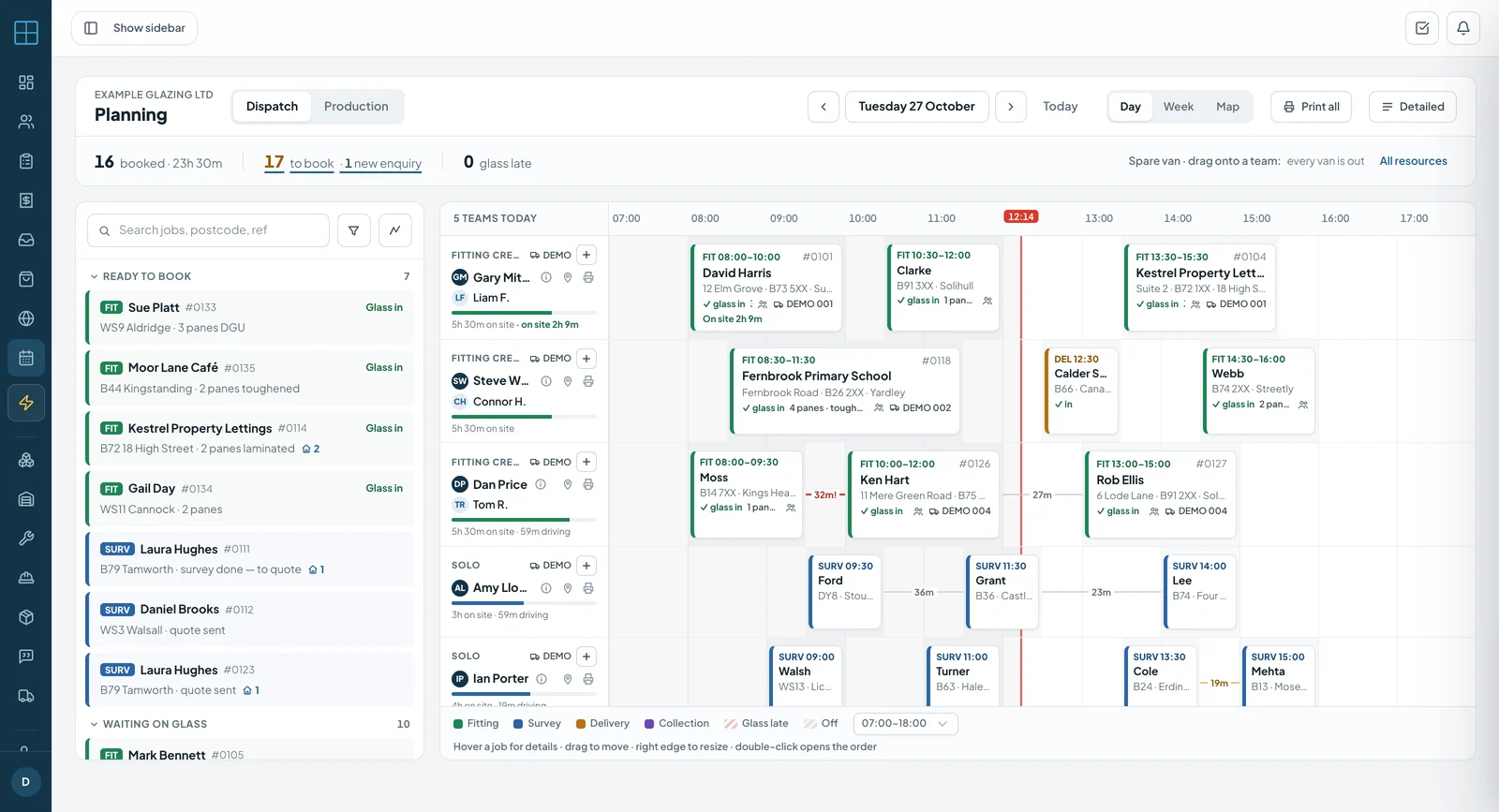
Drag jobs onto your team and vans, let customers tick the times that suit them, and let Coglass group nearby jobs into runs. Holidays block the board and bookings go straight to the fitters’ phones — without ten phone calls.
No sign-up. Click around a demo glazing company's day — sending is switched off, so nothing you do reaches anyone.
- No setup fee
- iPhone, Android & web
- Every feature on every plan
Fill the van without ringing round
Most planning time goes on phone calls to find a day that suits, then on driving across town between jobs. These tools cut both.
Customers pick the times that suit them
The problem. You ring to book a fitting, the customer is at work, you leave a message, and they ring back when you are up a ladder.
How Coglass fixes it. Press Request availability on the order — or let Coglass send it by itself when the job is ready for fitting. The customer gets an email link, taps every arrival window that suits and presses Send my times.
What you see
- A “When are you free?” page with your logo and the arrival windows you choose, such as 8–10 and 9–11
- A notification when they reply, and their times on the order
- Jobs still waiting for a reply listed on their own, so you know who to phone
Suggested runs
The problem. Ready jobs are spread across the area, and working out which ones go together on which day takes an evening with a map.
How Coglass fixes it. Suggested runs looks at every survey and fitting not yet booked, groups the jobs that are close together, and picks the best day for each group from the times customers said suit them.
What you see
- Runs by area for the next 7, 14 or 30 days, with the total hours and how many customers are free that day
- A week view, and a grid of every job against every day with a tick where the customer is free
- Schedule this run: pick the fitter, check the date, and the jobs go on the planner
Nearby jobs
The problem. A fitter has a job across town in the morning and nothing after — and there is probably another ready job five minutes away that nobody thought of.
How Coglass fixes it. Drop a job on someone’s day, or press the pin on their row, and Coglass lists other ready jobs only a short drive out of their way. It uses real driving time between the stops already booked, not distance on a map.
What you see
- Each job with the extra driving it adds, such as “+8 min”, grouped as Close, Short detour or Further
- Surveys, fittings and deliveries all offered
- Tick the ones you want and add them to the day — they go into the first free gaps, and nothing already booked moves
Anytime customers
The problem. Schools, surgeries, offices and trade counters are open all day. Asking them to pick a time just slows the booking down.
How Coglass fixes it. Switch on Flexible scheduling for the customer. Coglass stops sending them the availability email and treats them as free 8am to 6pm every day, so their jobs fit into any run.
What you see
- An Anytime label on their jobs in Nearby jobs, whatever day you are planning
- An override on a single order when one site is different
Glass that won’t be in on time
The problem. A fitting is booked for Tuesday, and on Monday you find the glass isn’t due until Thursday.
How Coglass fixes it. The planner checks each booking against the job’s purchase orders.
What you see
- The booking card turns hatched red when its glass won’t arrive in time
- Chase PO from the booking’s job card
Your whole team's week, planned in minutes
The Coglass planning board gives managers a full view of who is doing what, when — and pushes the schedule straight to everyone's phones.
Open the planning board
The scheduling view shows your full team in rows and upcoming dates in columns. At a glance you can see who's free, who's booked, and which days have gaps — for the week or the next two weeks.
Assign jobs to team members
Drag an order onto a team member's slot for a specific date. Set the visit type (survey, fitting, delivery), start time and duration. The assignment appears in that person's mobile app immediately — no call needed.
Allocate vehicles
Put a van with each team member for each day from the same board.
Block absences
Record holidays, sick days and training in the absence calendar. Absent team members show as blocked on the planning board — you can't accidentally book them in on a day they're off.
Team see their schedule on their phone
Bookings show in the field team's app — customer, address, visit type and time — without a call from the office.
See who’s on site
The Map view shows the day’s stops and where clocked-in staff are. When a fitter arrives or leaves, the booking shows how long they have been on site — and Print all gives every team its run sheet for the day.
Team management tools built for glazing companies
From scheduling fitters to tracking holidays — everything you need to manage a field team.
- Visual planning boardDrag-and-drop schedule with all staff in one view. See the full week or two-week outlook at a glance.
- Job assignment with time slotsAssign any order to any team member with specific start time and duration — survey, fitting or delivery.
- On their phoneBookings show in the team member's app, with a push notification when today's plan changes.
- Customer availability linkCustomers tick the arrival windows that suit them on a page in your branding. Send it by hand or automatically.
- Map view and run sheetsSee the day’s stops on a map, and print every team’s run sheet for the day.
- Vehicle allocationAssign a vehicle to each team member per day from the planning board.
- Holiday and absence managementRecord holidays, sick days and training. Absences block the planner so you can't double-book unavailable staff.
- Holiday chartVisual overview of all staff absences for the coming weeks — plan your resourcing before gaps appear.
- Employee managementStore staff details, roles, employee types, contact info and mobile app access in one place.
- Cards & certificatesKeep CSCS and other safety cards for each person — checked when you build a RAMS for a job.
- Roles and permissionsControl who can see and do what. Starts with owner, office manager, estimator, surveyor, fitter and shop-floor roles, each adjustable.
- Nearby jobsWhen you book someone, Coglass lists other ready jobs a short drive from their stops that day, with the extra minutes for each.
- Assignment notesAdd notes to any slot — special access instructions, customer preferences, equipment needed.
- Seat licence managementSee desktop and mobile user counts versus your plan limits — manage who has access without overpaying.
- Suggested runsReady jobs that are close together grouped into runs, on the days customers said suit them.
More of Coglass
Stop coordinating your team over WhatsApp
Book a demo and we'll walk you through it on the kind of jobs you do.
No sign-up. Click around a demo glazing company's day — sending is switched off, so nothing you do reaches anyone.